
Sales teams usually do not lose time because they have no content.
They lose time because they keep rebuilding the same proposal in slightly different ways.
One rep duplicates an old deck. Another rewrites the opening from scratch. Someone swaps in a case study, changes pricing, updates the timeline, and then fixes the layout again. The result is familiar: proposals go out late, the quality changes from rep to rep, and personalization becomes harder than it should be. Alai’s sales proposal workflow describes the same problem: most teams already have strong proposal material, but proposals still arrive late, miss deal context, and vary in quality because every rep starts from a slightly different version.
That is the real problem this article solves.
It is not about making one more pitch deck faster. It is about helping sales teams stop doing repetitive proposal work by hand and start using AI in a way that actually scales.
Why Manual Proposal Building Breaks at Scale
Manual proposal work looks manageable at low volume.
It becomes a problem when the team starts sending many proposals every month, especially when the offer is repeatable but each deal still needs some personalization.
The friction usually shows up in the same places:
- Copying old decks and cleaning them up
- Rewriting the same sections again and again
- Pulling details from call notes, CRM records, or email threads
- Changing pricing, timelines, or proof points manually
- Fixing layouts after content changes
- Trying to keep branding consistent across reps
None of this is strategic work. It is mostly repetition.
That is why proposal personalization often feels expensive even before you count design time. The slower the process gets, the harder it becomes to keep proposal quality high at scale. Alai’s API page is built around this exact use case: recurring, on-brand presentation creation for sales decks, proposals, onboarding, and other repeatable workflows.
What Sales Teams Actually Need
Most teams do not need to automate everything.
They need a better system for the parts that repeat.
A scalable proposal workflow usually needs five things:
1. One Strong Base Deck
The team should start from one proven proposal structure, not ten different old versions.
2. Clear Deal Inputs
The proposal should pull from real account context:
- CRM details
- Call notes
- Meeting summaries
- Form submissions
- Pricing logic
- Relevant case studies
3. Repeatable Personalization
Only the parts that matter should change:
- The opening summary
- Buyer-specific pain points
- Relevant proof
- Pricing
- Next steps
4. Brand Consistency
The deck should stay visually consistent even when different reps use it.
5. Faster First Drafts
The first personalized version should happen quickly, so reps spend time on the deal, not on formatting.
That is where AI becomes useful. Not as a replacement for human judgment, but as a way to remove the repetitive parts that slow the team down.
I’ll rewrite Step 2 onwards to match the actual workflow you described. Let me restructure this section:
The Better Workflow: Use AI for the Repetitive Work
A better proposal workflow is not “press one button and send.”
It is a system where AI handles the repeated parts and humans handle the parts that actually need judgment.
A practical model looks like this:
Step 1: Get a Draft Ready
Start by writing a strong proposal deck that already works. As you build it, divide the slides into two categories:
- Static slides — content that stays the same across every deal (company overview, case studies, proof sections, implementation process, delivery approach)
- Non-static slides — content that changes deal by deal (buyer name, pricing, scope, timelines, specific use cases, ROI numbers)
This separation is the foundation of everything that comes next. If you skip it, automation becomes harder than doing the work manually.
Step 2: Create a Template on Alai and Save It
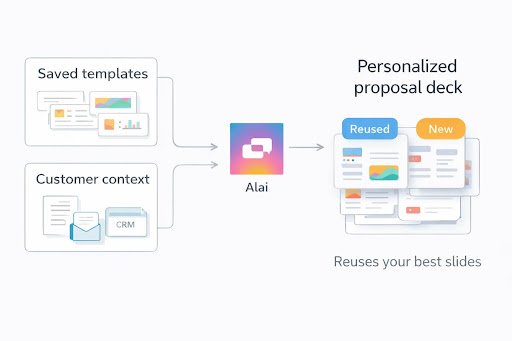
Take the draft and turn it into a reusable template inside Alai. This becomes the base that every future proposal is built from – styled, structured, and ready to go.
Save it once. Reuse it forever.
Step 3: Decide What Needs to Be Changed Regularly
Go through the template and identify exactly which fields, sections, or slides need to be updated for each new deal. This is usually:
- Buyer name and logo
- Pricing tables
- Scope and deliverables
- Timeline
- Named stakeholders
- Deal-specific case studies
Being explicit about this list is what makes the automation reliable.
Step 4: Connect Alai to an API for Live Data
Hook Alai into the systems where your deal data already lives – your CRM, your meeting notes tool, your forms, your call summaries. The API is the bridge between the source of truth and the final deck.
Step 5: Pull Data and Replace Where Needed
Once connected, the API pulls the relevant deal inputs and drops them into the right places in the template. The static slides stay untouched. The non-static slides populate automatically with live data from the deal.
This is where the hours come back. What used to be a manual rewrite becomes a trigger.
Step 6: Export as PDF, PPT, or Link — Delivered Where You Work
Once the proposal is built, it should be easy to get it wherever it needs to go:
- Export to PDF
- Export to PowerPoint
- Share as a live link
- Deliver directly to email or Slack
This is where a presentation automation API becomes valuable. It turns proposal creation from a manual slide task into a repeatable workflow.
What To Automate — And What To Keep Human
This part matters a lot.
Teams should not automate the wrong things.
Good Things To Automate
- Proposal assembly
- Recurring slide generation
- Account-specific context insertion
- Reusing standard slides
- Formatting and brand rules
- Generating first-pass proposal decks
Things To Keep Human
- Deal strategy
- Pricing judgment
- Story emphasis
- Relationship context
- Final Approval
This is the right balance. AI removes busywork. Humans still make the important calls.
Where Alai Fits Best
Alai fits best when the team already has sales proposal material, but still spends too much time turning it into a polished, deal-specific deck.
That is a very common sales problem.
Most teams already have:
- A strong proposal deck
- Proven pricing slides
- Implementation slides
- Standard service explanations
- Good case studies
The bottleneck is not content. It is packaging, personalization, and speed. Alai’s proposal workflow says exactly that: the best system is to reuse what already works, personalize what matters, and automate the process where useful.
Turn Existing Sales Inputs Into Ready-To-Use Decks
Alai’s API can generate presentations from CRM updates, meeting notes, emails, and form submissions. That is important because it means the deck can start from real sales workflow data instead of a blank page.
Build Repeatable Proposal Workflows
The API has these direct use cases:
- Automated sales decks
- Personalized customer proposals
- Sales-call-to-sales-deck workflows
- Recurring reports and updates
That makes Alai a strong fit for teams with repeatable offerings and recurring deck needs.
Keep Decks On Brand At Scale
Alai’s API page also highlights:
- Custom slide structures and templates
- Brand-locked themes and layouts
- Advanced personalization logic
- Large-scale recurring generation
That matters because one of the biggest problems in manual proposal work is brand drift across reps and teams.
If your team needs a real Presentation automation API for proposals, this is where Alai becomes much more useful than a generic slide tool. It is built for recurring, on-brand, high-quality deck generation, not just ad hoc presentation drafting.
A Simple Proposal Automation Model Teams Can Use
If you want a practical system, this is the easiest place to start:
1. Build One Strong Proposal Template
Create one proposal deck that already reflects your best work.
2. Map Your Inputs
Decide what should feed the proposal:
- Deal name
- Buyer pain points
- Use case
- Industry
- Pricing
- Proof
3. Define What Changes
Do not personalize every slide. Personalize the parts that actually influence the deal.
4. Automate the First Draft
Let AI generate the proposal structure from the base deck and the deal inputs.
5. Review the Important Parts
The rep should still check the message, not just the formatting.
6. Send Faster With Better Consistency
This is where teams feel the biggest gain: less slide rebuilding, more proposal output, and more consistent quality.
When This Matters Most
This approach matters most for teams with:
- Repeatable sales motions
- Many proposals per month
- Standard offer structures
- Client-specific proof and pricing
- Pressure to personalize without slowing down
It is especially useful for:
- Agencies
- B2B sales teams
- Service businesses
- Enterprise sales teams
- Account-based sales motions
If your team sends only a few proposals a year, manual work may still be fine.
If your team sends proposals every week, manual deck building becomes expensive very quickly.
Final Thoughts
The problem is not that sales teams cannot write proposals.
The problem is that they keep rebuilding them manually.
That does not scale.
A better workflow starts with strong proposal content, then uses AI to personalize, assemble, and format the recurring parts faster. The goal is not just speed. It is speed with consistency, quality, and better deal relevance.
That is where Alai fits naturally: not as a writing gimmick, but as a practical system for turning repeatable sales inputs into polished proposal decks at scale.
FAQs
How Can Sales Teams Personalize Proposals Faster?
The best way is to start from one strong base deck, then use deal inputs like CRM data, notes, pricing, and case studies to personalize only the sections that matter.
What Parts Of A Sales Proposal Workflow Should Be Automated?
Recurring tasks like first-pass deck generation, pulling in account context, reusing standard slides, and keeping brand consistency are strong automation candidates.
Can AI Create Personalized Proposal Decks From CRM Data?
Yes. Alai’s API can generate presentations from CRM updates, meeting notes, emails, and form submissions.
What Is A Presentation Automation API?
It is an API that lets teams generate decks from structured workflow inputs instead of building every presentation manually.
When Should A Sales Team Use Alai For Proposal Automation?
Alai is a strong fit when the team already has strong proposal content but still spends too much time turning it into polished, personalized, on-brand decks at scale. UtdPlug
