
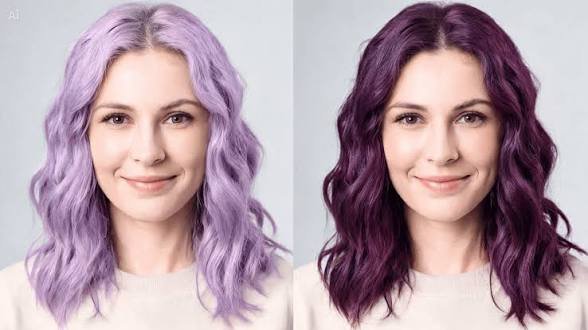
Thinking about going purple, but afraid of a color you will hate in two weeks? A virtual hair color try on lets you see the result on your own photo before a single drop of hair dye touches your head. Today, an AI hair color changer can turn dark brown strands into soft lavender or rich violet hair in seconds, and you can use that image as a clear talking point during a salon consultation. This guide explains how these tools work, what to look for, how to use CapCut’s online option step by step, and where a preview stops being useful. Everything here is written in plain, easy words.
Key Takeaways
- A hair color filter changes the hair in your photo while keeping your face and background the same.
- Good tools keep strands, curls, and shadows visible, so the result does not look like flat paint.
- Clear lighting and a visible hairline give the best previews.
- A preview shows a direction. It cannot predict how your real hair will react to bleach or dye.
- Show the final image to a stylist, and do a patch test before any real dye.
What Is a Purple Hair Filter and How Does It Work?
A purple hair filter is an image editing feature that changes the hair in a photo to purple while keeping the face, background, and overall portrait recognizable. You upload a photo, the tool finds the hair, and it recolors that area. Modern tools use artificial intelligence to find the edges of the hair, so the color does not spill onto your forehead or the wall behind you.
The CapCut tools page describes its version as a way to preview lavender, plum, or violet hair before dyeing, bleaching, or booking a salon visit. The page also calls it free and easy for portraits. Since tools and limits can change, check the current terms on the page before you start.
The goal is not a flat color overlay. A useful tool should keep the strands, shadows, curls, bangs, and highlights in place. When those details survive, you can judge the shade fairly, because the photo still looks like you.
Why Try Purple Hair Before You Dye It?
Hair color is a bigger decision than most people expect. Purple is also one of the shades that changes the most from person to person, because it depends on your skin tone, your haircut, and the light around you. A preview helps with three things.
| Benefit | What it means for you |
| Avoid color regret | You can see whether bold violet suits your face before any dye is used |
| Choose better undertones | Cool and warm purples are easier to compare side by side |
| Share a clear reference | A stylist can see the exact direction instead of guessing what “purple” means |
These benefits match what the CapCut page lists for its tool, and they fit common sense too. Color words are loose. One person’s “purple” is another person’s “pink.” A photo ends that confusion.
Know Your Purple Shades
Before you test anything, it helps to know the names you will see in color menus and salon books.
| Shade | Look and feel | Who often likes it |
| Lavender | Soft, light, and pastel | People who want a gentle change |
| Amethyst | Sharper, with a cooler edge | People who want a bolder look |
| Violet | Bright and clear | People who want a strong statement |
| Plum | Dark, warm, and rich | People who want color that feels wearable every day |
| Burgundy purple | Dark with a red tone | People with dark hair who want a quiet change |
The CapCut page notes that lavender can soften a look, amethyst can feel sharper, and plum can add depth when bright violet feels too strong. Test at least three of these on the same photo. Often the shade you did not expect to like is the one that wins.
How to Choose a Good Hair Color Preview Tool
Not every tool gives the same result. Look at these points before you trust one.
- Detail stays visible. Hair should still look like hair, with strands and shadows.
- Shade choice. You should be able to compare more than one purple.
- Easy start. You should not need to learn photo retouching.
- Clear terms. Read the privacy policy before you upload a face photo.
- Good export. The final image should be sharp enough to show a stylist.
Many tools work in a web browser, so you do not need to install anything. That makes it easy to test a few options in one evening and compare them side by side.
How to Use the CapCut Purple Hair Filter Online
The exact buttons may change over time, but the flow is simple. On the CapCut tool page you will see an Upload image button and a Generate button.
- Pick a clear photo. Use daylight if you can, with your face forward and your hair visible.
- Open the tool page. Go to the CapCut purple hair tool and choose Upload image.
- Add your portrait. Wait for the photo to load fully.
- Generate the preview. Select Generate and look at the result.
- Compare shades. Try lavender, violet, and plum on the same photo.
- Save your favorite. Keep the best version so you can show it later.
No design skill is needed. The tool is built for photo-based color previewing, so you can upload a portrait, test shades, compare results, and decide without manual retouching.
Photo Tips for Better Results
The tool can only work with what it sees. These small habits make a big difference.
| Tip | Why it helps |
| Use even daylight | Shadows and strong yellow bulbs can shift the color you see |
| Keep hair edges visible | The tool can find the hair outline more easily |
| Avoid hats and heavy filters | Extra layers can confuse the hair detection |
| Use a sharp, high-resolution photo | Fine strands stay clear after the change |
| Try two photos | A second angle shows how the shade looks from the side |
Does a Purple Hair Filter Work on Dark Hair?
Yes, it can, as long as the photo has clear lighting and visible hair edges. The CapCut page also points out that dark, rich shades such as plum or burgundy purple often look more realistic on dark hair than pale lavender.
There is a real-life reason for this. On the actual head, dark brown or black hair usually needs lightening before a pale or bright purple will show up clearly. A preview can make pastel purple look easy, but the real route may include bleach and toner. If you have dark hair, test the darker purples first, then ask a stylist what the pale ones would take.
An Example Scenario
Here is a made-up example to show how this works in practice. It is not a real customer story.
Maya has dark brown, shoulder-length hair. She likes the idea of purple but worries it will look too bright for her office. She takes one daylight photo and tests lavender, violet, and plum. Lavender looks pretty, but she knows it would need bleach. Violet feels too loud for her taste. Plum looks soft, easy to wear, and close to her natural shade. She saves that image, books a consultation, and asks the stylist whether plum can be done without heavy lightening. She walks in with a clear goal instead of a vague word.
The lesson is simple: the preview did not make the decision for her. It made the conversation better.
What a Preview Cannot Tell You
A photo filter is a guide, not a promise. Keep these limits in mind.
- It cannot predict how your own hair will take color, since that depends on your starting shade, past dye, and hair health.
- It cannot show how fast a vivid shade will fade.
- It cannot replace a stylist’s advice about bleach, toner, and upkeep.
Safety matters too. In the United States, labels on coal-tar hair dyes carry a caution that tells users to do a patch test before use, because some people have allergic reactions. The American Academy of Dermatology also advises a patch test before coloring your hair at home. Follow the label on whatever product you choose, and ask a professional if you have sensitive skin or past reactions.
Other Ways People Use Purple Hair Previews
Dye is not the only reason to try one.
- Costume and character looks. The CapCut page lists themed outfits and fantasy portraits as one use, so you can add purple hair to an image without wigs, spray, or dye.
- Social posts. Creators can test a new look before posting.
- Gift and event planning. A quick preview can help a friend decide on a party look.
If you also edit videos, CapCut offers an online editor alongside its image tools, so a finished photo can sit in the same workspace as your clips.
Common Mistakes to Avoid
- Judging a color from a dark or blurry photo.
- Testing only one shade and calling it done.
- Skipping the patch test because the preview looked good.
- Expecting the filter to show exactly how dye will look after bleach.
- Uploading photos without reading the privacy policy.
Frequently Asked Questions
What is a hair color filter?
It is an image editing feature that changes the hair color in a photo while keeping the rest of the photo the same.
Can I try different purple shades?
Yes. Tools like this can support lavender, violet, amethyst, plum, and darker purples, depending on the controls available.
Will the result match my real hair after dyeing?
Not exactly. The preview gives you a direction. Your starting color, past dye, and the product used will change the final look.
Is it useful before going to a salon?
Yes. A saved preview turns your idea into a visual reference that is easier to discuss with a stylist.
Do I need design skills?
No. You upload a portrait, test shades, and compare results without learning manual retouching.
Final Thoughts
Going purple is fun, but it is easier when you know what you are walking into. Take a clear photo, test several shades, and pay attention to how each one sits with your skin tone and style. Treat the result as a guide, not a promise. Then bring your favorite image to a stylist, ask honest questions about bleach and upkeep, and do a patch test before any dye touches your hair. With a little patience, the look you pick will be one you still love next month.
